 CastCut
 › Remove silences and ums
How to remove silences and filler words from a video podcast
Long pauses and ums make an episode feel slow, and they are the most tedious thing to cut by hand. Here is how to remove them in Final Cut Pro, Premiere Pro and DaVinci Resolve, and how to do it automatically without losing the natural rhythm.
Try 2 exports free See pricing
Apple silicon Mac (M1 or newer), macOS 14+. No account or card. Trial MP4 exports carry a small getcastcut.com mark.
Quick version
Cut the dead air between answers and the ums at the start of sentences; keep the pauses that land a point. Do it by hand with the Blade tool, from the transcript in Premiere Pro, or let CastCut find every silence and filler word and show you the list before it cuts.
What to cut, and what to keep
- Cut: pauses longer than about a second between answers, ums and uhs at the start of a sentence, false starts, and words said twice.
- Keep: a beat before a punchline, a pause while someone thinks about a hard question, and laughter.
- Go easy: removing every pause makes people sound rushed. Aim for tight, not breathless.
How to remove them in each editor
- Final Cut Pro. There is no built-in silence remover. Turn on audio waveforms, press B to blade either side of each pause or um, select the piece and press Delete. In a multicam clip one cut removes it from every angle.
- Premiere Pro. Transcribe the sequence and edit from the text: the Text panel can show pauses and filler words like uh and um, which you can review and delete from the sequence transcript. Check each cut, since some pauses are there on purpose.
- DaVinci Resolve. Recent versions can transcribe clips and let you edit from the text, though some of these tools need the paid Studio version. Otherwise use the Blade tool (B) and Ripple Delete, pause by pause.
Why multicam makes it harder
In a multicam podcast every pause lives in three or four cameras and the audio at once. Cut it in only one place and the sync breaks. Cutting the multicam clip itself in the timeline keeps every angle together, but it is still one pause at a time, and a one-hour episode can have a hundred of them.
The automatic way: CastCut
Tick Long silences and Ums and ahs (and False starts or Repeated takes if you want). CastCut finds them in the audio and the transcript, cuts every camera together, and shows the list first, so you keep the pauses that matter.
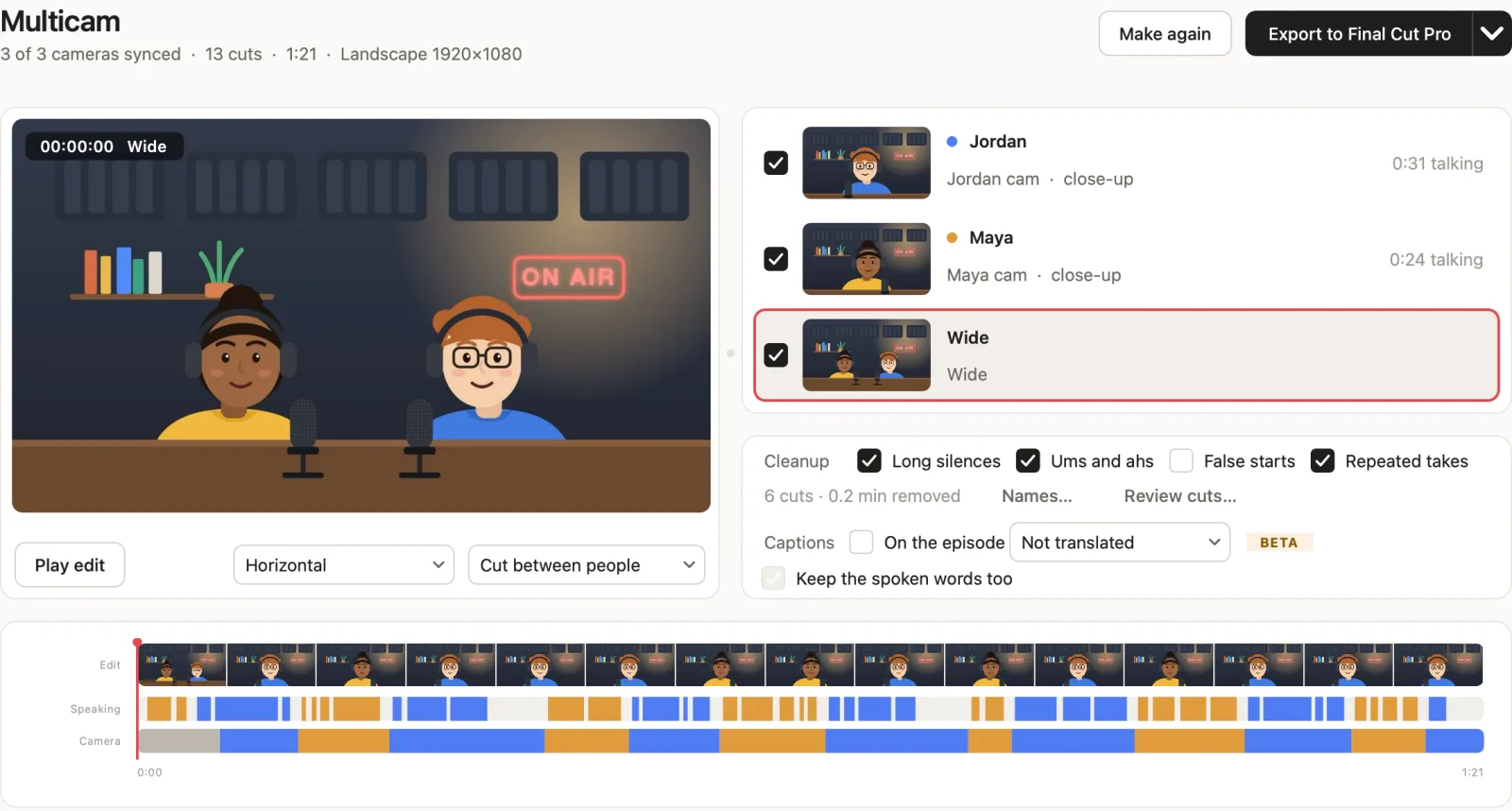
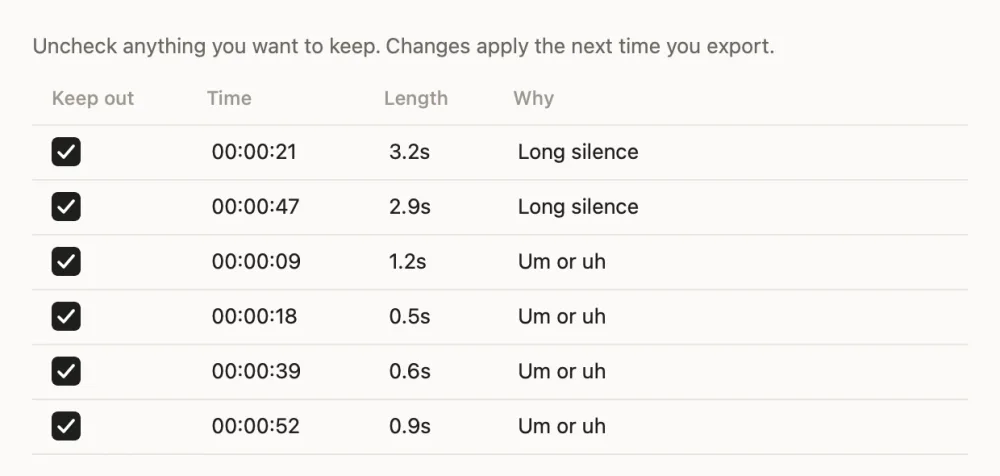
The result goes to Final Cut Pro, Premiere Pro or DaVinci Resolve as a normal timeline, so you can still put any piece back.
Questions
How do I remove silences from a podcast automatically?
Use a tool that detects pauses and cuts them for you. CastCut finds long silences and ums in a multicam podcast, cuts every camera together, and lists each cut so you can keep any.
Can Final Cut Pro remove filler words?
Not on its own. You cut each um with the Blade tool, or use a tool like CastCut before Final Cut opens.
Can Premiere Pro remove ums?
Its text-based editing can show filler words and pauses in the sequence transcript so you can delete them. Review each one before deleting.
Will removing pauses make the conversation sound rushed?
It can if you remove all of them. Cut the dead air between answers and keep the pauses that land a point.
Does CastCut cut every camera at once?
Yes. Each silence or filler cut applies to every camera and the audio together, so sync never breaks.
Try it on your next episode
Your first 2 exports are free. No account or card. Apple silicon Macs, macOS 14 or later.